
This guide will walk you through how to install the necessary client programs to use the Mirasys VMS on a separate computer.
-
Instructions for installing Spotter can be found here
-
Instructions for installing System Manager can be found here
Administrator user rights are needed for installation.
System Manager, Spotter, and System Monitor
If a Spotter or System Manager or both clients are already installed, those need to be uninstalled before proceeding with the System Manager and Spotter installation.
-
Download the System Manager, Spotter, and System Monitor installer package from the Extranet or Documentation site Software download section.
-
Filename example Mirasys-VMS-Update-VX.X.X.exe
-
-
Double-click the package and wait for the installation to start.
-
Click Install to continue installation.
-
This will take some time until the necessary components are installed.
-
-
Click Next to continue the installation.
-
Change the installation location if needed. Click Next to continue the installation.
-
Change the Recorder feature to disabled and then click Next to continue the installation.
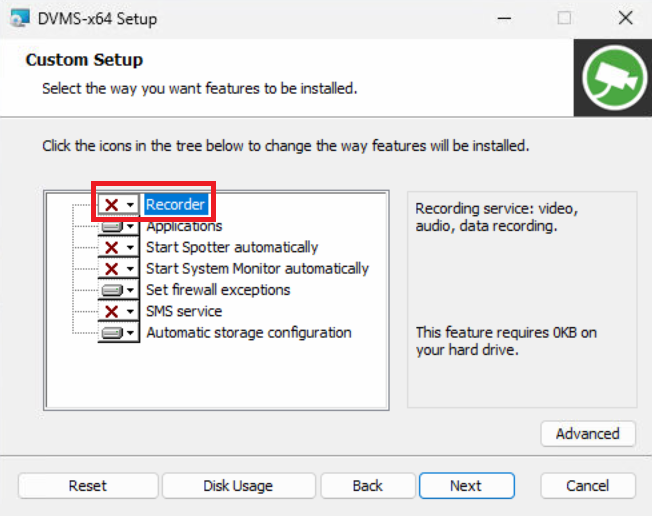
-
Fill in the Management Server IP address or DNS name.
-
If you don’t know the address, you can continue using the computer’s local address.
-
See here how to change the Server address.
-
-
Click Next to continue installation.
-
Click Install to make the installation.
-
When the installation is finished, click Finish to close the installation.
-
Close the installation window by clicking Close.
-
Now System Manager, Spotter, and System Monitor -clients are installed.