
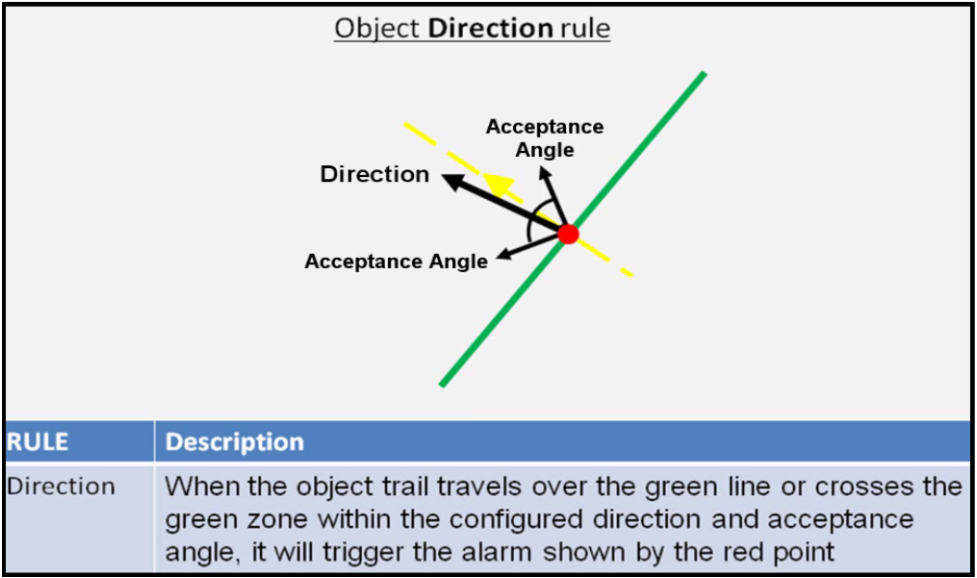
The direction rule detects objects moving in a specific direction.
Configure the direction and acceptance angle by moving the arrows on the direction control widget.
The primary direction is indicated by the large central arrow.
The acceptance angle is the angle between the two smaller arrows.
Objects that travel in the configured direction (within the limits of the acceptance angle), through a zone or over a line, trigger the rule and raise an event.
The following image illustrates how the white car moving in the configured direction triggers the rule whereas the other objects do not.
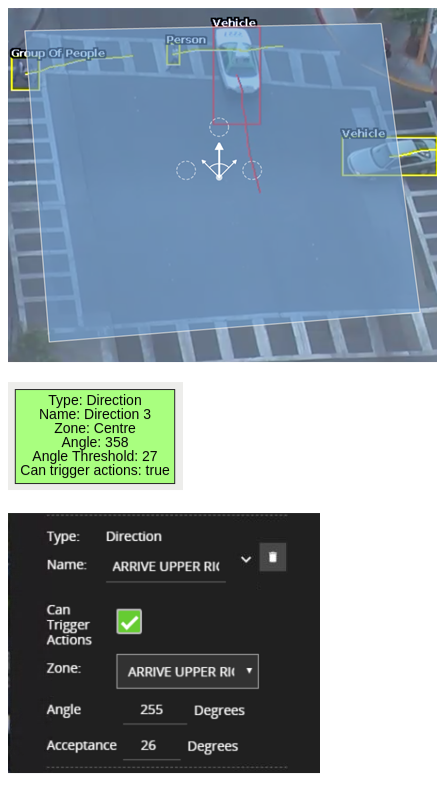
Configuration Direction
|
Property |
Description |
Default Value |
|
Name |
A user-specified name for this rule |
"Direction #" |
|
Can Trigger Actions |
Specifies whether events generated by this rule trigger actions |
Active |
|
Zone |
The zone this rule is associated with |
None |
|
Angle |
Primary direction angle, 0 - 359. 0 references up. |
0 |
|
Acceptance |
Allowed variance on each side of the primary direction that will still trigger rule |
0 |