Speed Filter
The speed filter provides a way to check if the speed of an object which has triggered an input is moving within the range of speeds defined by a lower and upper boundary.
The channel must be Calibrated in order for the speed filter to be available.
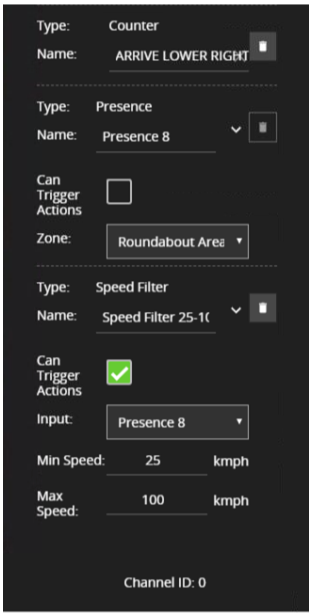
Commonly this rule is combined with a presence rule, an example rule graph is provided to illustrate this below.
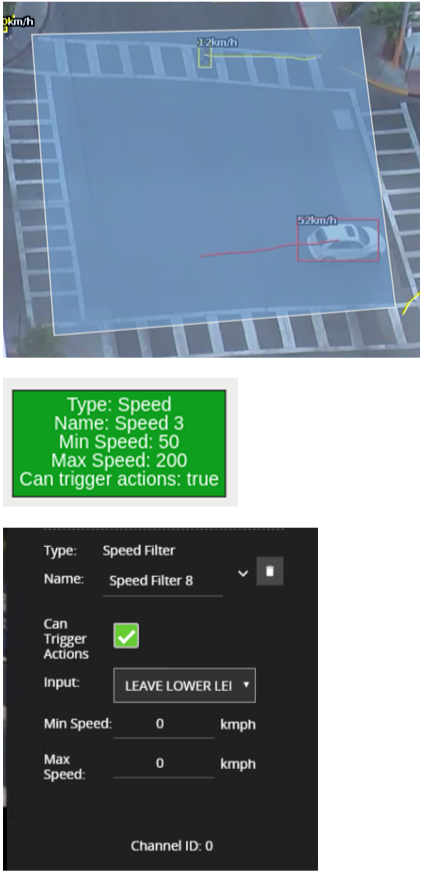
The following image illustrates how such a rule combination triggers on the car moving at 52 km/h but the person moving at 12 km/h falls outside the configured range (25-100 km/h) and thus does not trigger the rule.
|
Property |
Description |
Default Value |
|---|---|---|
|
Name |
A user-specified name for this rule |
"Speed #" |
|
Can Trigger Actions |
Specifies whether events generated by this rule trigger actions |
Active |
|
Input |
The input rule |
None |
|
Min Speed |
The minimum speed (km/h) an object must be going to trigger the rule |
0 |
|
Max Speed |
The maximum speed (km/h) an object can be going to trigger the rule |
0 |
Typical Logical Rule Combination
The below example logical rule checks if an object triggering the presence rule attached to zone Centre, is also travelling between 25 and 100 km/h as specified by the speed rule Speed Filter 25-100 km/h.
Only the Speed Filter is set to Can Trigger Actions, meaning only this component of the logical rule will be available as a source for actions. Additionally, any activity generated by the speed filter will have the event type Presence