
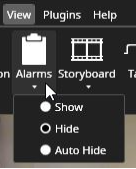
In Spotter, each Spotter window can have its alarm list. The alarm list visibility is controlled from the View menu.
In the alarm window, you can see the name and the priority of each alarm.
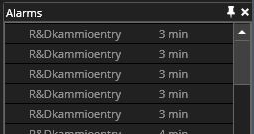
To the right of the alarm name, you can how much time has elapsed since the alarm started. This is displayed in hours, minutes, and seconds.
Frequently Used Keyboard Shortcuts:
|
Shortcut |
Description |
|
F5 |
Focuses on the first alarm. |
|
Ctrl+F5 |
Show/hide alarm window. |
|
Enter |
Opens the alarm in the alarm view tab. |
|
Space |
Acknowledges the focused alarm. |
|
Ctrl+Alt+A |
Hide/show the alarm list. |