
You can optimize the display for your requirements.
Display
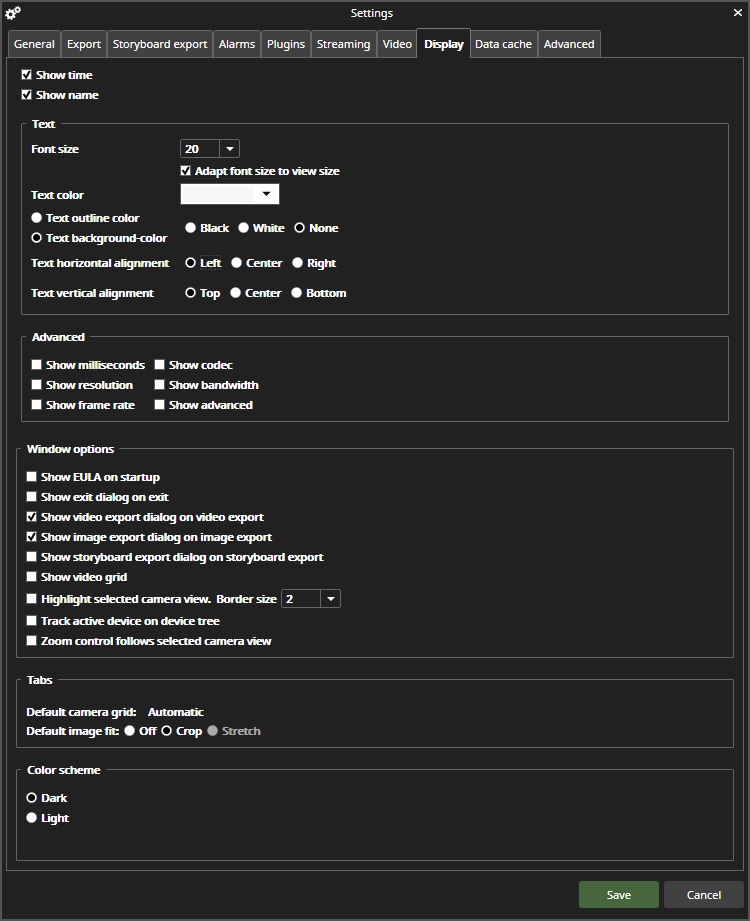
-
Show time
-
If set, show the image time on the video
-
-
Show name
-
if set, show the camera name on the video
-
Text
-
Font size
-
Select the text font size on the video
-
-
Adapt font size to view the size
-
Adapt font size to the best match for view size
-
-
Text Color
-
Select text color from the available color palette
-
-
Text outline color and Text background color
-
Can adjust text lookout
-
-
Text horizontal alignment and Text vertical alignment
-
Can select text position on video
-
Advanced
-
Show milliseconds
-
Show milliseconds with time
-
-
Show resolution
-
Show image resolutions
-
-
Show frame rate
-
Show image framerate
-
-
Show codec
-
Show image compression codec
-
-
Show bandwidth
-
The show displayed video stream bandwidth
-
-
Show advanced
-
Show advanced information can use when analyzing streaming behaviors
-
Window options
-
Show EULA on the startup
-
If selected, show EULA on the startup
-
-
Show exit dialog on the exit
-
Show video export dialog on video export
-
Show image export dialog on image export
-
Show storyboard export dialog on the storyboard export
-
Show video grid
-
Show video grid borders
-
-
Highlight the selected camera view. Border size xx
-
Track active devices on the device tree
-
If selected, highlight the active device on the device tree. Normally last selected is highlighted.
-
-
Zoom control follows the selected camera view
Tabs
-
Default camera grid
-
Use the selected camera grid when opening a new tab
-
-
Default image fit
-
Use selected image fit for newly opened cameras
-
Color scheme
-
Select a Dark or Light overall color scheme