The deep learning filter provides the ability to filter out objects that trigger a rule if they are not classified as a certain class by the deep learning model. The available object classes are defined by the model.
The deep learning filter settings are configured on the Deep Learning page.
On VCAserver, the Deep Learning Filter can use GPU acceleration. See Deep Learning Requirements for hardware requirements.
Without GPU acceleration, the deep learning filter will use the CPU, enabling the deep learning filter on multiple channels that generate a high volume of events (more than 1 per second), which may result in poor performance of the system and is not advised.
Rule combining and object class parameters
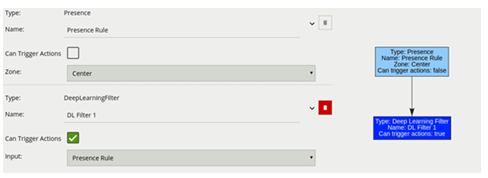
Typically, the deep learning filter would be combined with another rule(s) to prevent unwanted objects from triggering an alert; an example rule graph is provided to illustrate this below. Please note that the deep learning filter cannot be used as an input to any other rule type. As such, it must be the last rule in a graph.
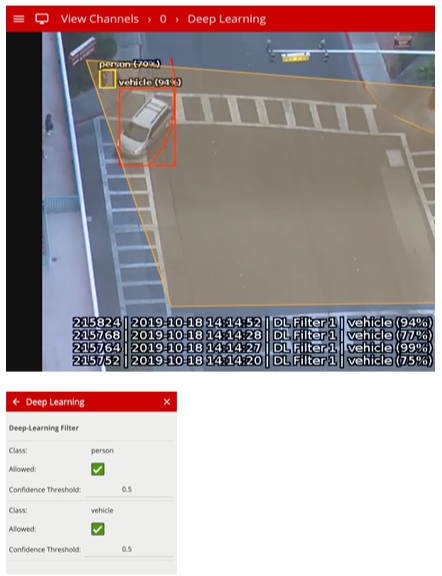
Each of the possible object classes has additional parameters:
Allowed: Whether this object type will be allowed to pass through the filter. If this is unchecked, any objects classified as this type will not trigger any actions.
Confidence Threshold: A value (0.0 - 1.0) representing the minimum confidence level required for classification. Any objects with a lower classification score than this minimum value will be filtered out and will not trigger any actions.
The previous image illustrates how the deep learning filter configured with just the vehicle class (Confidence Threshold 0.5), only triggers on the vehicle object.
The person in the zone is filtered out since the person class Allowed setting is not enabled in the Deep Learning configuration page.
|
Property |
Description |
Default Value |
|---|---|---|
|
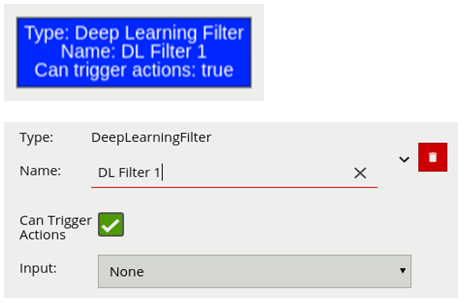
Name |
A user-specified name for this rule |
"DL Filter #" |
|
Can Trigger Actions |
Specifies whether events generated by this rule trigger actions |
Active |
|
Input |
The input rule |
None |
Typical Logical Rule Combination
The below example logical rule checks if the object triggering the presence rule attached to zone Centre, is one of the classes of interest defined in the Deep Learning settings page (see above settings page image).
Only the deep learning filter is set to Can Trigger Actions, meaning only this component of the logical rule will be available as a source for actions.
Additionally, any activity generated by the speed filter will have the event type Presence.