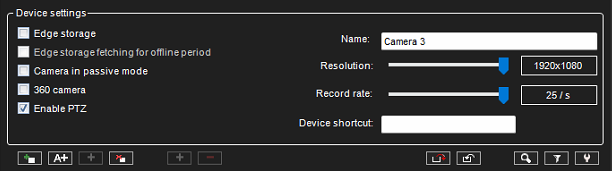
Edge Storage
The Edge storage functionality enables uninterrupted recording during network blackouts. In practice, in-network blackout, the video feed can be stored on an SD memory card on the camera.
Once the network connection has been re-established, video is transmitted from the camera’s SD card to the server. Please refer to the camera manufacturer documentation to see what cameras support the feature.
Edge storage must be enabled in the device settings. This feature is configured solely through the camera’s configuration utility. Please refer to the camera’s documentation for instructions on enabling Edge storage.
Edge storage fetching for offline period
When this is enabled, then Mirasys VMS transfers recordings from the camera SD card only from the time of the period, when the connection has been lost between the Mirasys VMS and IP camera
Camera in passive mode
-
If multiple servers have the same camera configured, then one should be made Active, and the others should be Passive.
-
This way, only the Active server settings are communicated to the camera.
360 Camera
When this setting is enabled, the camera is registered as a 360 camera.
Enable PTZ
PTZ capabilities can be turned on or off for the camera with this option. This setting is visible only when the camera is detected to be a PTZ camera.
Camera information
Camera name, resolution, record rate, and device shortcut can be set directly from the Video tab.