Software Download
Integrate with Mirasys
Request a Feature
Training Portal
Contact Support
V9.9
V9.8
V9.7
V9.6
V9.5
V9.4
Main navigation
Close navigation
V9.9
V9.8
V9.7
V9.6
V9.5
V9.4
Main
Software Download
Integrate with Mirasys
Request a Feature
Training Portal
Contact Support
Main
Overview of This Guide
Technical Support
What is the Mirasys VMS software?
What does a System Contain?
VMS Servers
Master Server
Client Programs
Network Requirements
OS Compatibility
Configuring the System
Log In
Logging in
Locking System Manager
Management User Interface
System
System settings
General System Settings
E-Mail Settings
Command Settings
Change VMS Server Addresses
System Addresses
Axis one-click dispatcher settings
Update VMS Servers
Incident Reporting Settings
Add values
Edit values
Changing the order of the values
Storage Locker Settings
List Management settings
Backup
Export logs
Back up settings
Restore settings
Monitoring
Audit trail log
SM Server Diagnostics
Server Diagnostics
Licenses
License details
License Management
Watchdog
Watchdog settings
Watchdog log
Watchdog event list
Add-ins
Installing External Driver Packages
Installing Metadata Drivers
Installing Client Drivers
Install client plugin
The VMS Servers
General
Port Forwarding
Automatic Router Configuration
Single Server Behind Router
More Than One Server Behind Router
More Than One Server On Multiple Sites
Hardware
Video
Add device
IP Camera Finder
Edit IP Camera
Removing IP cameras and encoders
Replacing an IP camera
Audio
Device Settings
Adding cameras by using CSV file
Adding and Removing VMS Servers
Cameras
Camera settings
General settings
Streams
Multi-Streaming
Advanced
Frame rate optimization
Moxa settings
RTSP Server Streaming
Motion Detection
Editing a mask
VCA features
Privacy
Privacy zone on the camera
Privacy zone on the client
Object Blurring
Scheduler
License Plate Recognition settings
Face Recognition Settings
VCA settings
Audio .
Adding, Editing and Removing Audio Devices
Audio Settings
General Settings tab
Audio Detection
Scheduler (Audio)
Digital I/O
Digital I/O Settings
LoopBack I/O
Logical I/O
Countdown I/O
Scheduled IO
HTTP IO
UniversalOutputDriver
Alarms
Storage
Text Channels
Profiles
Creating a customer-specific profile
PTZ camera profile settings
Users and User groups
User group
User Roles
System Manager Enterprise role
Monitoring role
Gateway role
Mirasys Spotter Enterprise role
Playback Speed Role
Smart List Management role
Spotter Web role
Exporting and Importing User Role Settings
Two-factor authentication
Protection
Creating a customer-specific User Group
Domain Based User Groups (LDAP)
Creating a customer-specific user
User account settings
Disabling or Activating a User Account
TruCast
Supported Cameras
Network Optimization
Multistreaming and TruCast for Network Optimization and Storage
Using TruCast
Failover Servers
Minimum requirements
VMS Server roles
Building Failover system
Failback
Breadcrumbs
Home
Mirasys VMS Admin Guide
System
Licenses
On this Page
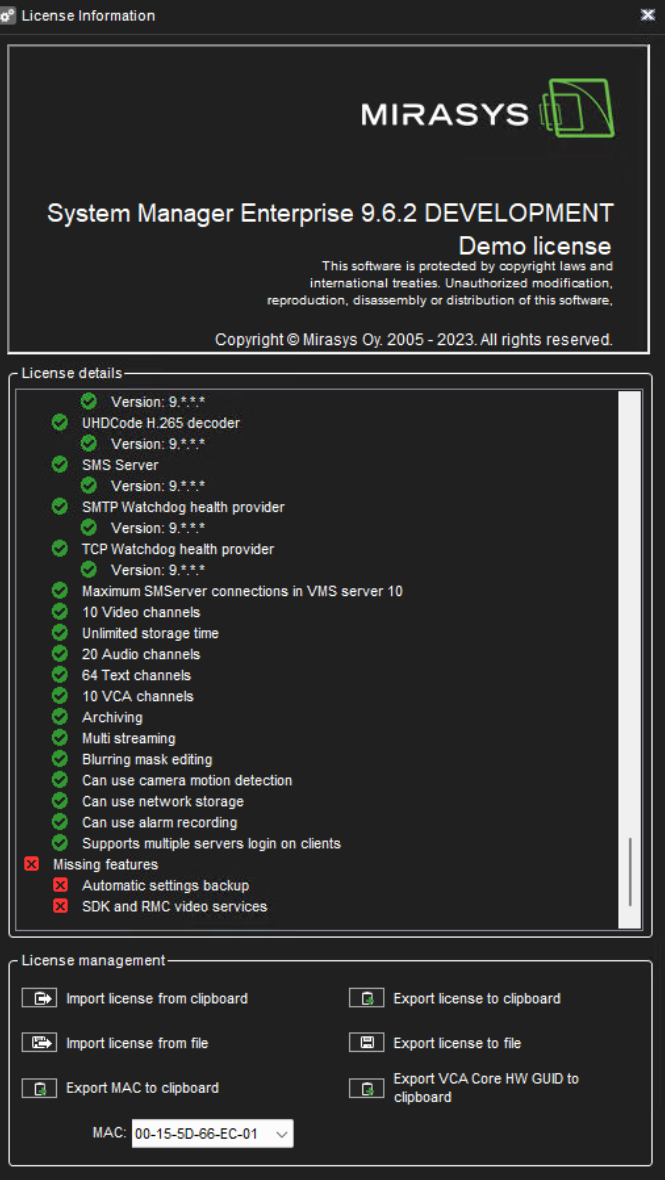
License details
License details show all supported features of the license.