Replacing an existing IP camera in the Mirasys VMS
If the new camera uses a different driver than the current one, the old camera must be removed before adding the new camera.
To replace the existing IP camera with a new one, complete the following steps:
-
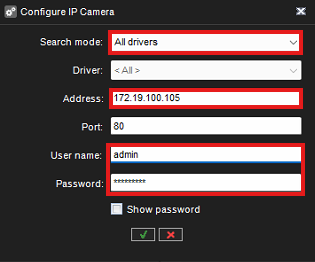
Add an existing IP camera address for the new IP camera
-
Set the same username and password for the new IP camera
-
Connect the camera to the network
-
Select the camera from the Hardware list
-
Click Edit IP camera

-
Select Search mode: All drivers
-
Check that the camera has the correct IP address
-
Check that the username and password are correct
-
Click OK
-
Select the correct driver from the Accept IP camera driver selection
-
Click OK