
Content from Spotter can be exported in two different formats and into two different locations simultaneously with dual export. Dual export can be enabled for the user role in user role settings. When dual export is enabled, the settings can be configured separately for the primary and secondary export in Spotter. The exportable content for dual export includes:
-
Video clips
-
Images
-
Storyboards
-
Storyboard drafts
Note that dual export is turned off by default in user role settings. The option to enable dual export is not visible in Spotter if dual export has not been enabled in System Manager first.
Enabling dual export for the user role:
-
Go to the Users and User groups tab in System Manager
-
Double-click on a user group
-
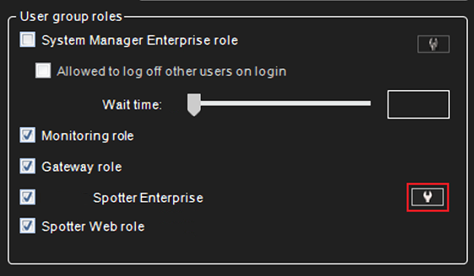
Click Edit Mirasys Spotter Enterprise role properties in the User group roles section
-
Go to the Export tab
-
Tick the checkbox for Enable dual export
-
Save changes
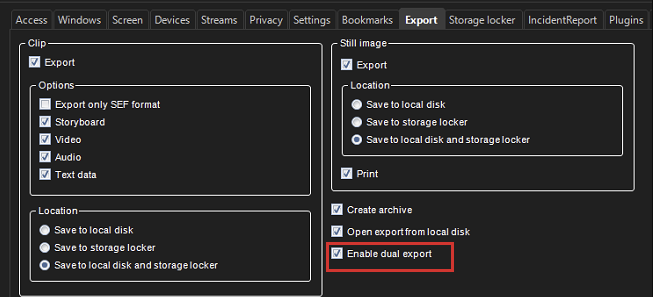
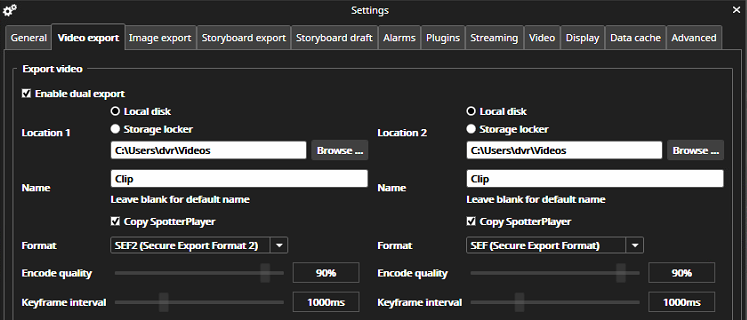
After dual export has been enabled in user role settings, it can be enabled in Spotter. The option to enable dual export in Spotter can be found in settings, under the content export tabs. When the checkbox for Enable dual export is ticked, the option to configure settings for two exports becomes available. Settings for secondary export can also be configured in the export dialog when exporting video clips or storyboards.
Dual export must be enabled separately for different types of exportable content in Spotter settings.
Configuring dual export settings in Spotter settings:
-
Go to Spotter Settings
-
Go to the desired export tab (Video, Image, Storyboard, or Storyboard Draft)
-
Tick the checkbox for Enable dual export
-
Configure settings for primary and secondary export
-
Click Save
Exporting with dual export:
-
In the Spotter camera toolbar menu under Export, select the content type you wish to export
-
Configure the settings for the exports in the export view if needed (ensure that Enable dual export has been selected)
-
Click Export
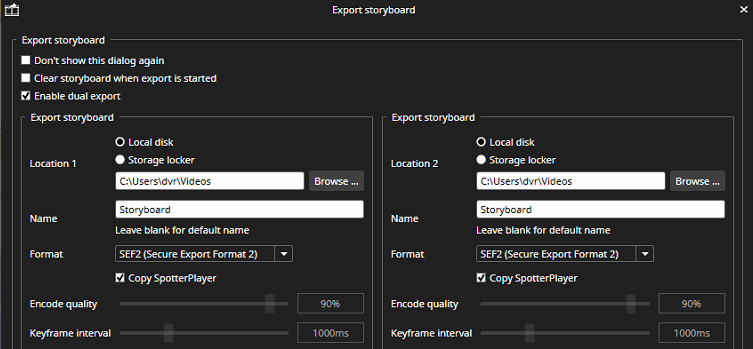
The two exports occur concurrently, and the progress of each export is shown in its own dialog box, both of which are visible on the screen at the same time. The user will be notified if one of the exports fails.