
Exporting material
The system allows you to export material as follows:
-
Drag the desired camera(s) from the device tree or work area onto the timeline.
-
Or click the Export button in the camera(s)' context menu.
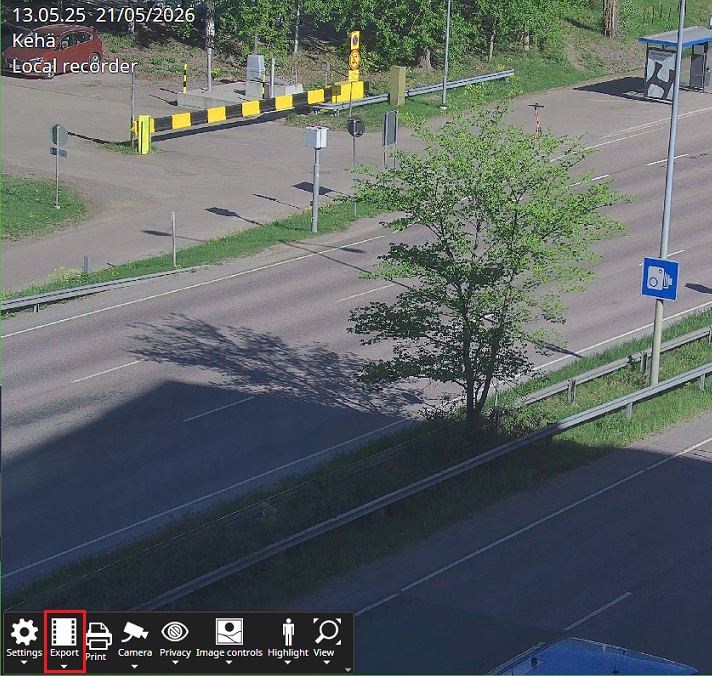
-
When the selected camera or cameras are in the Export section, you can select the desired time period either by entering the date and time or by using the mouse to drag the yellow markers to the desired start and end times.

-
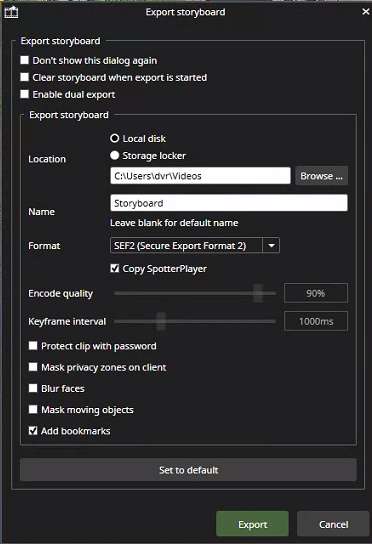
After this, click the green Export button, which opens a window where you can specify the following:
-
Location where the material will be saved
-
Name
-
Inclusion of the playback program
-
Export format
-
Configuration for additional settings
-

-
Finally, click the Save button to start exporting the material to the desired location.
-
The first time you do this, you will need to accept the terms of use.
-