Skip to main content
Software Download
Integrate with Mirasys
Request a Feature
Training Portal
Contact Support
V 9.10
V 9.9
V 9.8
V 9.7
V9.6
V9.5
Main navigation
Close
V 9.10
V 9.9
V 9.8
V 9.7
V9.6
V9.5
Main
Software Download
Integrate with Mirasys
Request a Feature
Training Portal
Contact Support
Main
Introduction
Starting Spotter and Logging In
Changing the Spotter language
Spotter UI
Real-time mode
Opening single camera or device
Opening device group
Virtual Cameras
Camera Tour Controls
Full-Screen Mode
Camera Toolbar
Spotter Camera Settings
Spotter Export (Spotter Export Chapter)
Print
Two-Way Audio
Camera
Spotter Privacy
Image Controls
Highlight
View
Spotter Digital Zoom
Spotter Text channels
Audio channels
Spotter Digital I/O
Playback mode
Export
Bookmarks
Search Tools
Layouts Management
Device Tabs Management
PTZ Control and Management
Alarm Management
System Monitoring
Failover Logs
Plugins
Input devices
Spotter 360 Cameras
Spotter Settings
Spotter Keyboard Shortcuts
Spotter About Screen
Breadcrumbs
Home
Spotter Guide
Real-time mode
Camera Toolbar
On this Page
Print
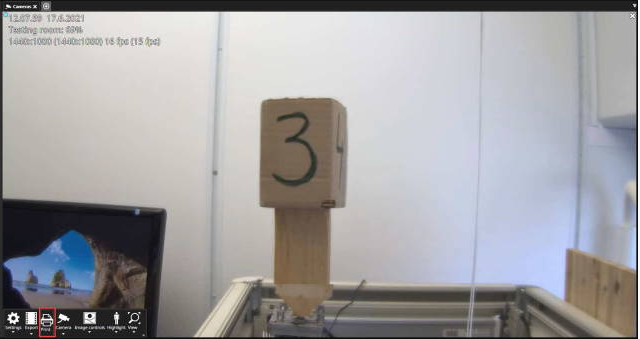
Open camera toolbar
Click
Print
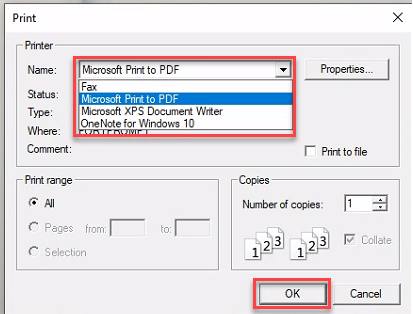
Select the printer
Click OK