Software Download
Integrate with Mirasys
Request a Feature
Training Portal
Contact Support
V 9.9
V 9.8
V 9.7
V9.6
V9.5
Main navigation
Close navigation
V 9.9
V 9.8
V 9.7
V9.6
V9.5
Main
Software Download
Integrate with Mirasys
Request a Feature
Training Portal
Contact Support
Main
Introduction
Installing Spotter
Installing Spotter With VMS Installer package
Installing Spotter With Spotter-Only Installer
Starting Spotter and Logging In
Changing the Spotter language
Spotter UI
Spotter Title Menu
Spotter Device Tree
Spotter Device Numbering
Spotter Work Area
Spotter Playback panel
Real-time mode
Opening single camera or device
Opening device group
Virtual Cameras
Camera Tour Controls
Full-Screen Mode
A single camera on the device tab
Multiple cameras on the device tab
Camera Toolbar
Spotter Camera Settings
Spotter Export (Spotter Export Chapter)
Print
Two-Way Audio
Camera
Spotter Privacy
Image Controls
Highlight
View
Spotter Digital Zoom
Spotter Text channels
Audio channels
Spotter Digital I/O
Playback mode
Start instant playback
Playback selected time
Camera Grid in Playback Panel
Image Fit in Playback Panel
Export
Export image
Add to video export
Add to storyboard
Create Archive
Open Media
Media file authenticity verification
Bookmarks
Creating a bookmark
Editing a bookmark
Deleting a bookmark
Bookmarks in the timeline panel
Search Tools
Alarm Search
Commenting alarms
Motion Search
Person search
Text data search
Thumbnail Search
Layouts Management
Saving the layout
Opening the layout
Editing the layout
Layout numbering
Device Tabs Management
Add new device tab
Renaming the device tab
Saving the device tab
Opening the saved device tab
Deleting the saved device tab
Automatic image fit
Camera Grids
PTZ Control and Management
Alarm Management
Alarm List
Opening alarm from the alarm list
Alarm Export
Alarm Filtering
Acknowledge alarm
Alarm visualization
Alarm view
Alarm popup
Signal Lost Alarms
Showing the Alarm Name in Alarm Popup View
Use of Multiple Alarm Monitors
System Monitoring
Camera Audit
Diagnostic
Watchdog Event Search
Failover Logs
Plugins
Spotter Alarm View
Spotter Alarm Popup
Smart Recognition
Smart Search
Smart List Management
Spotter Easy LPR
Spotter Easy LPR Live
Spotter Easy LPR Search
Spotter Easy LPR Lists
Adding plate number to Lists
Editing plate number in Lists
Moving between the lists
Exporting plate numbers
Removing plate number
Importing plate numbers in Lists
Uploading list
Spotter Camera Carousel
Incident Reporting
Monitor Manager
Mirasys Video Wall Management (AVM)
Profile Maps
Profile Map Devices
Spotter Storage Locker
Spotter Web Browser
Input devices
DirectX devices
AXIS joystick
VM Desktop default setup (DirectX and AXIS)
Spotter 360 Cameras
360 De-Warping
Direct Control of 360 Cameras
Spotter Settings
Spotter General Settings
Spotter Export Settings
Spotter Storyboard Settings
Spotter Alarm Settings
Spotter Alarm visualization settings
Spotter Alarm View settings
Spotter Alarm popup settings
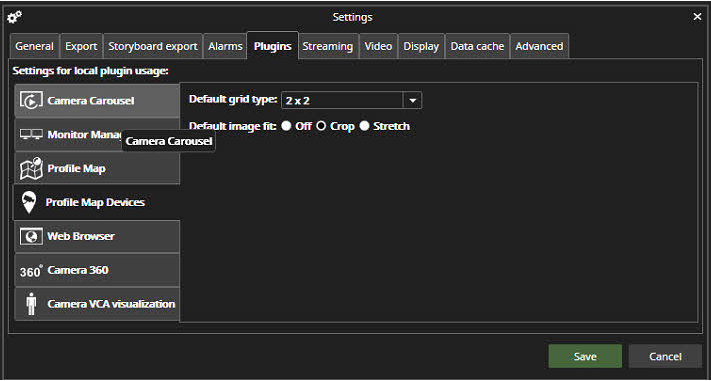
Spotter Plugin Specific Settings
Spotter Camera Carousel settings
Spotter Monitor Manager settings
Spotter Profile Map settings
Spotter Profile Map Devices settings
Spotter Web Browser settings
Spotter Camera 360 settings
Spotter VCA visualization settings
Spotter Streaming Settings
Spotter Video settings
Spotter Display Settings
Spotter Data Cache Settings
Spotter Advanced Settings
Spotter Keyboard Shortcuts
Spotter About Screen
Breadcrumbs
Home
Spotter Guide
Spotter Settings
Spotter Plugin Specific Settings
On this Page
Spotter Profile Map Devices settings
Default grid type
Default image fit
Off
Crop
Stretch