
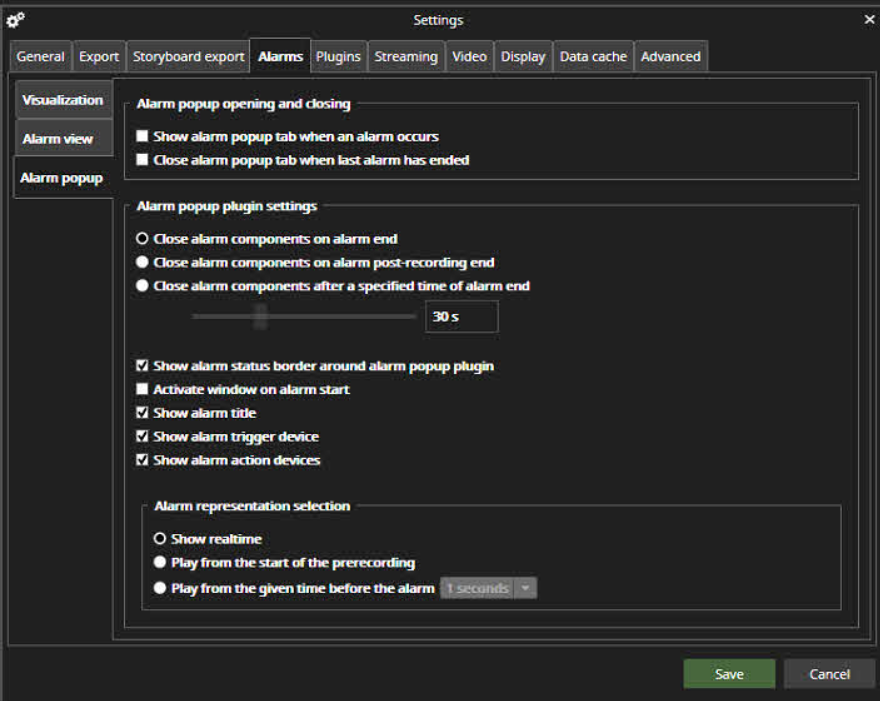
Alarm popup settings define how the Alarm popup view opens and closes.
The default setting is that the Alarm popup is not opened and closes automatically if it is not open.
Alarm popup opening and closing
If the user wants the Alarm popup to not open normally and only when an alarm happens, he should select the first checkbox.
If the user wants the Alarm popup closed automatically after the last active alarm ends, he should check the second checkbox.
Alarm popup plugin settings
The second part of the Alarm popup settings defines how long the alarm components are displayed in the popup tab. The possibilities are:
-
Alarm components are closed when the alarm ends (default option)
-
Close alarm components on alarm post-recording end
-
Close alarm components after a specified time of alarm ended(5 seconds – 30 minutes).
-
Show alarm status border around alarm popup plugin
-
Activate the window on the alarm start
-
Show alarm title
-
Show alarm trigger device
-
Show alarm action devices
Alarm representation selection
-
Show real-time (default)
-
Play from the start of the prerecording
-
Play from the given time before the alarm(1-60 seconds)